My end goal is to feed an RTSP video stream into OBS, using GitHub - fzwoch/obs-gstreamer: GStreamer OBS Studio plugin · GitHub . I have managed to get this working with avdec_h264 and the following pipeline:
rtspsrc latency=10 location=rtsp://192.168.1.231:554/11 ! queue ! rtph264depay ! avdec_h264 ! video.`
and I can verify this in the terminal in Ubuntu 24.04 with:
GST_DEBUG=3 gst-launch-1.0 rtspsrc location=rtsp://192.168.1.231:554/12 ! rtph264depay ! avdec_h264 ! autovideosink
This works and produces a video in a pop-out window in the terminal and a slow video feed in OBS.
We have just installed an nvidia GTX 1650 so that we can do hardware decoding of the camera stream and keep the stream latency low. I’m trying to verify the nvh264dec part of the pipeline in the terminal but it keeps aborting. This is my test pipeline for nvdec:
sudo GST_DEBUG=3 gst-launch-1.0 rtspsrc location=rtsp://192.168.1.231:554/11 name=bin bin. ! rtph264depay ! h264parse ! nvh264dec ! autovideosink
Which results in a log like this:
0:00:00.046566412 20674 0x59f2c45a4a70 WARN               cudanvrtc gstcudanvrtc.cpp:152:gst_cuda_nvrtc_load_library_once: Could not open nvrtc library libnvrtc.so: cannot open shared object file: No such file or directory
Setting pipeline to PAUSED ...
Pipeline is live and does not need PREROLL ...
Got context from element 'nvh264dec0': gst.cuda.context=context, gst.cuda.context=(GstCudaContext)"\(GstCudaContext\)\ cudacontext1", cuda-device-id=(uint)0;
Progress: (open) Opening Stream
Pipeline is PREROLLED ...
Prerolled, waiting for progress to finish...
Progress: (connect) Connecting to rtsp://192.168.1.231:554/11
Progress: (open) Retrieving server options
Progress: (open) Retrieving media info
Progress: (request) SETUP stream 0
Progress: (open) Opened Stream
Setting pipeline to PLAYING ...
New clock: GstSystemClock
Progress: (request) Sending PLAY request
Redistribute latency...
0:00:01.320363466 20674 0x7f7a38000d90 FIXME                default gstutils.c:4088:gst_element_decorate_stream_id_internal:<fakesrc0> Creating random stream-id, consider implementing a deterministic way of creating a stProgress: (request) Sending PLAY request
ream-id
Redistribute latency...
Progress: (request) Sent PLAY request
Redistribute latency...
Redistribute latency...
0:00:03.485871649 20674 0x7f7a38001480 WARN               h264parse gsth264parse.c:1490:gst_h264_parse_handle_frame:<h264parse0> input stream is corrupt; it contains a NAL unit of length 0
0:00:03.485928735 20674 0x7f7a38001480 WARN               h264parse gsth264parse.c:1496:gst_h264_parse_handle_frame:<h264parse0> warning: Broken bit stream
WARNING: from element /GstPipeline:pipeline0/GstH264Parse:h264parse0: Could not decode stream.
0:00:03.486090119 20674 0x7f7a38001480 WARN               h264parse gsth264parse.c:1490:gst_h264_parse_handle_frame:<h264parse0> input stream is corrupt; it contains a NAL unit of length 0
Additional debug info:
../gst/videoparsers/gsth264parse.c(1496): gst_h264_parse_handle_frame (): /GstPipeline:pipeline0/GstH264Parse:h264parse0:
Broken bit stream
0:00:03.486113420 20674 0x7f7a38001480 WARN               h264parse gsth264parse.c:1496:gst_h264_parse_handle_frame:<h264parse0> warning: Broken bit stream
WARNING: from element /GstPipeline:pipeline0/GstH264Parse:h264parse0: Could not decode stream.
Additional debug info:
../gst/videoparsers/gsth264parse.c(1496): gst_h264_parse_handle_frame (): /GstPipeline:pipeline0/GstH264Parse:h264parse0:
Broken bit stream
Redistribute latency...
0:00:03.486529573 20674 0x7f7a38001480 WARN                GST_CAPS gstpad.c:5819:pre_eventfunc_check:<nvh264dec0:sink> caps video/x-h264, stream-format=(string)byte-stream, alignment=(string)au, width=(int)2560, height=(int)1440, framerate=(fraction)0/1, coded-picture-structure=(string)frame, chroma-format=(string)4:2:0, bit-depth-luma=(uint)8, bit-depth-chroma=(uint)8, colorimetry=(string)1:3:5:1, parsed=(boolean)true, profile=(string)baseline, level=(string)5 not accepted
0:00:03.486738071 20674 0x7f7a38001480 WARN                GST_CAPS gstpad.c:5819:pre_eventfunc_check:<nvh264dec0:sink> caps video/x-h264, stream-format=(string)byte-stream, alignment=(string)au, width=(int)2560, height=(int)1440, framerate=(fraction)0/1, coded-picture-structure=(string)frame, chroma-format=(string)4:2:0, bit-depth-luma=(uint)8, bit-depth-chroma=(uint)8, colorimetry=(string)1:3:5:1, parsed=(boolean)true, profile=(string)baseline, level=(string)5 not accepted
0:00:03.486952842 20674 0x7f7a38001480 WARN                GST_CAPS gstpad.c:5819:pre_eventfunc_check:<nvh264dec0:sink> caps video/x-h264, stream-format=(string)byte-stream, alignment=(string)au, width=(int)2560, height=(int)1440, framerate=(fraction)0/1, coded-picture-structure=(string)frame, chroma-format=(string)4:2:0, bit-depth-luma=(uint)8, bit-depth-chroma=(uint)8, colorimetry=(string)1:3:5:1, parsed=(boolean)true, profile=(string)baseline, level=(string)5 not accepted
0:00:03.487115683 20674 0x7f7a38001480 WARN                GST_CAPS gstpad.c:5819:pre_eventfunc_check:<nvh264dec0:sink> caps video/x-h264, stream-format=(string)byte-stream, alignment=(string)au, width=(int)2560, height=(int)1440, framerate=(fraction)0/1, coded-picture-structure=(string)frame, chroma-format=(string)4:2:0, bit-depth-luma=(uint)8, bit-depth-chroma=(uint)8, colorimetry=(string)1:3:5:1, parsed=(boolean)true, profile=(string)baseline, level=(string)5 not accepted
0:00:03.641393845 20674 0x7f7a38000fe0 WARN                 basesrc gstbasesrc.c:3177:gst_base_src_loop:<udpsrc0> error: Internal data stream error.
0:00:03.641476192 20674 0x7f7a38000fe0 WARN                 basesrc gstbasesrc.c:3177:gst_base_src_loop:<udpsrc0> error: streaming stopped, reason not-negotiated (-4)
ERROR: from element /GstPipeline:pipeline0/GstRTSPSrc:bin/GstUDPSrc:udpsrc0: Internal data stream error.
Additional debug info:
../libs/gst/base/gstbasesrc.c(3177): gst_base_src_loop (): /GstPipeline:pipeline0/GstRTSPSrc:bin/GstUDPSrc:udpsrc0:
streaming stopped, reason not-negotiated (-4)
Execution ended after 0:00:02.322403326
Setting pipeline to NULL ...
Freeing pipeline ...
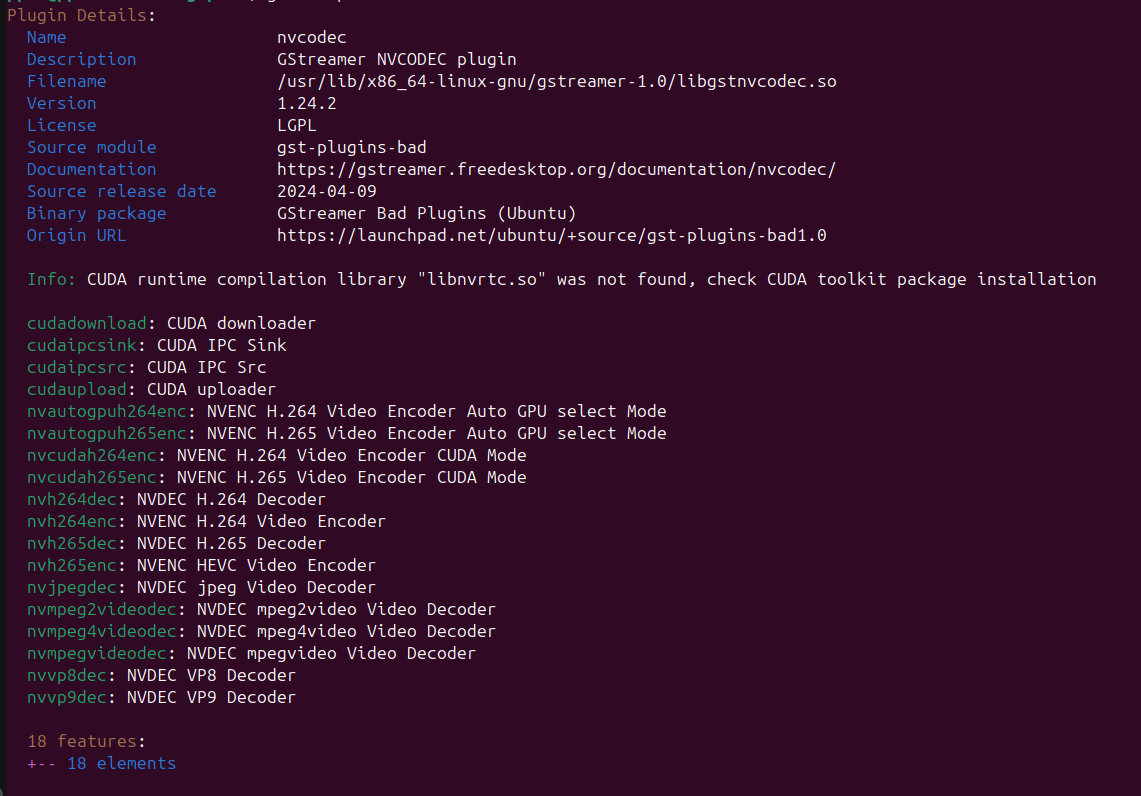
I believe I have the plugins correctly installed
And there is a proper result to nvidia-smi
$ nvidia-smi
Wed Mar  4 23:11:20 2026
+-----------------------------------------------------------------------------------------+
| NVIDIA-SMI 590.48.01              Driver Version: 590.48.01      CUDA Version: 13.1     |
+-----------------------------------------+------------------------+----------------------+
| GPU  Name                 Persistence-M | Bus-Id          Disp.A | Volatile Uncorr. ECC |
| Fan  Temp   Perf          Pwr:Usage/Cap |           Memory-Usage | GPU-Util  Compute M. |
|                                         |                        |               MIG M. |
|=========================================+========================+======================|
|   0  NVIDIA GeForce GTX 1650        Off |   00000000:01:00.0  On |                  N/A |
| 25%   42C    P3             22W /  100W |     552MiB /   4096MiB |      3%      Default |
|                                         |                        |                  N/A |
+-----------------------------------------+------------------------+----------------------+

+-----------------------------------------------------------------------------------------+
| Processes:                                                                              |
|  GPU   GI   CI              PID   Type   Process name                        GPU Memory |
|        ID   ID                                                               Usage      |
|=========================================================================================|
|    0   N/A  N/A            2281      G   /usr/lib/xorg/Xorg                      173MiB |
|    0   N/A  N/A            2567      G   /usr/bin/gnome-shell                     76MiB |
|    0   N/A  N/A            3095      G   ...exec/xdg-desktop-portal-gnome          7MiB |
|    0   N/A  N/A            3374    C+G   /usr/bin/obs                             94MiB |
|    0   N/A  N/A            3443      G   ...--log-file=/usr/bin/debug.log          2MiB |
|    0   N/A  N/A            3660      G   .../7901/usr/lib/firefox/firefox        170MiB |
|    0   N/A  N/A           15679      G   /usr/bin/nautilus                         8MiB |
|    0   N/A  N/A           15717      G   /usr/bin/gnome-text-editor                7MiB |
+-----------------------------------------------------------------------------------------+
(sorry - it would only let me put one screenshot in for my first post)
Please could someone suggest what troubleshooting steps I should try to get this RTSP + nvdec pipeline working?