Hi ,
this is the launchparse i use
gst-launch-1.0 -e rtspsrc location="<rtspurl>" latency=200 buffer-mode=4 !
rtph264depay ! h264parse config-interval=-1 !
splitmuxsink location=“video_%03d.mp4” max-size-time=10000000000 reset-muxer=true async-finalize=true `
muxer-properties=“properties,streamable=true,faststart=true,moov-recovery-file=true,fragment-duration=1000000000”
I ask splitmux to split video every 10 seconds and it splits the video every 10 seconds. however, if I play the video via vlc i see the length increases by 10 seconds.
Look at the attached image.
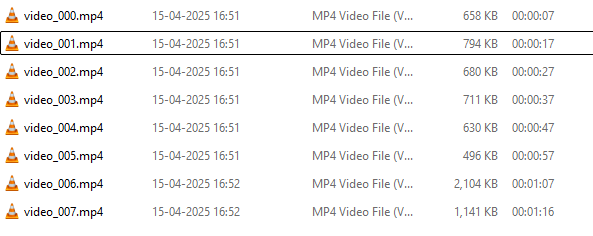
as you can the length keeps increasing by 10 seconds but when i play the video is only 10 seconds in duration which is accurate.
to solve the problem i have to use ffmpeg which i dont want to.
ffmpeg -i video_006.mp4 -c copy -map 0 -movflags +faststart fixed.mp4
Can someone tell me whats the issue.
This is the version i use
gst-launch-1.0 version 1.24.2
GStreamer 1.24.2
Unknown package origin
Thanks
Aswin Paranji