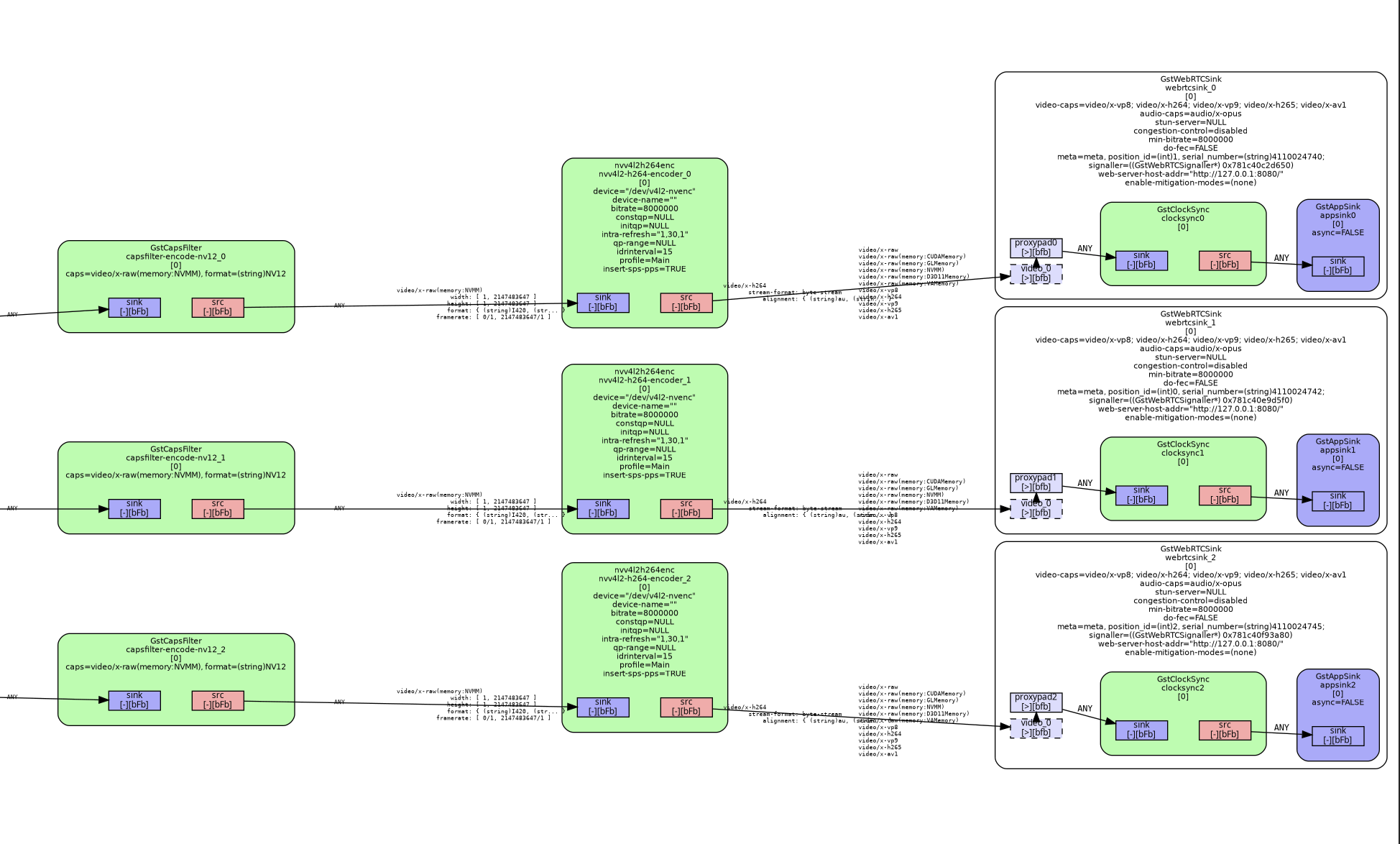
When I run the pipeline I get the error below and no frames via webrtc. Removing the h264parse element has no effect. Additionally, when I run nvidia-smi encodersessions I see that a session gets created and vram is used, but the average fps and latency are always zero.
0:00:22.222943224  1176 0x7f37740011a0 WARN       codecparsers_h264 gsth264parser.c:2473:gst_h264_parser_parse_slice_hdr: couldn't find associated picture parameter set with id: 0
0:00:22.223103477  1176 0x7f37740011a0 WARN               h264parse gsth264parse.c:2028:gst_h264_parse_handle_frame:<h264parse1> Failed to update backlog
I’ve replaced webrtcsink with avimux ! filesink location=output.avi and it works, but I suspect it’s still not using the hardware encoder because nvidia-smi encodersessions still shows average fps and latency as zero.
webrtcsink works well when passing xraw frames to it. What I believe happens is that inside the webrtcsink the encoder is dynamically created as the encoding parameters have to be adapted on the fly (to adjust bitrate, compression rate, etc.) depending on the network bandwidth.
I also haven’t figured out how to use it with a hardware_encoder, e.g. nvvh264enc. Did you manage to run a webrtcsink with a hardware encoder in a pipeline?
I would like to also join this discussion, as i am unable to find a solution for using nvh264enc together with webrtcsink.
Right now i am running this pipeline, streaming 3 GigE cameras to a Chrome Web UI
With this i am loosing all the good stuff from webrtcsink controlling bitrate etc..
Since for now the sink and UI are on localhost at the same time, this is running ok, but unstable.
I am dropping frames both in pipeline and Browser it seems, i have no good idea how to really profile this.
Have you tried feeding the raw NVMM frames directly into webrtcsink and letting it create the H.264 encoder internally?
In your pipeline, each branch uses nvv4l2h264enc before webrtcsink, so the sink receives an already encoded H.264 stream. In that configuration, webrtcsink can packetize and transmit the stream, but it cannot control the bitrate of the external encoder.
As a first step, you could remove nvv4l2h264enc from one branch and pass the raw NVMM frames directly to the sink:
It would then be useful to check which encoder webrtcsink selects internally through its encoder-setup signal.
For profiling the drops, you could compare the webrtcsinkstats property with Chrome’s chrome://webrtc-internals/. This should help determine whether frames are dropped before reaching WebRTC or later in the browser.
Hi @Julian_Camacho
in this topic i was able to solve my problem:
There was a reason for the “manual” encoder before webrtcsink.
The sink was not able to discover a fitting encoder with NVMM as input caps and the video caps set to h-264 encoding.
After applying patches to the nvidia encoder from the linux for tegra version of the element it works, even with proper congestion control.